-->

In

3 Reasons why Among Us is trending now after the release in 2018

This post was last updated on 

Although released in 2018, Among Us suddenly shot up the trending list recently. It is currently one of the most popular action-based games on Steam and also on mobile devices. But the question that arises is why this game suddenly propelled into the spotlight almost 2 years after release? Here are the 3 reasons for this sudden rise of Among Us in the trending list.


What is Among Us?

Among Us is a murder-mystery style game available for both PC and Mobile. Players are given the role of either Crewmate or Impostor (max 3). The Impostors must kill off the Crewmates without being noticed. The Crewmates are given the job of finding who the impostor is through problem-solving and communication, whilst the impostors must try to keep away suspicion.

Among Us Trending

During meetings, the whole crew can choose to vote out who they think is the impostor. If they are right, then its 1 impostor down, but if they are wrong, you and the rest of the crew just helped the impostor by throwing out an innocent. This is what makes the meetings the best part of the game. The uncertainty over who to trust, and the need to prove yourself as innocent is what brings the fun out of Among Us.


Why Among Us is popular now?

Among Us has been on the trending list for many reasons. Here are the most important for this rise in popularity.

1. Twitch Streams: The first shot to popularity

A Twitch employee, going by the name, Pluto recommended the game to a Twitch Streamer named Sodapoppin. He then went on to stream Among Us along with a group of his friends to his 2.8 million Twitch followers.

Among Us Trending

The majority of viewers seemed to enjoy the game, which led to the game becoming popular amongst other Streamers, YouTubers, and the regular community. Social media in general played a huge part in making the game trending. A lot of popular internet celebrities played the game to a huge audience.

2. Release of The Henry Stickmin collection

The developers as well as the publishers of Among Us, Innersloth, released The Henry Stickmin Collection on 7th August 2020, which was quite a popular game amongst Streamers and YouTubers.

Among Us Trending

The same devs were also publishers of Among Us, some people decided to try it out.

3. The low cost availability of Among Us

The final reason may not be as important as the other two, but it still played a big role in the game’s surge of popularity. During the Steam Summer Sale, Among Us dropped to $1, which was a great deal for such a game. Also, in general, Among Us is not as costly as other big games, as it sits at a reasonable $5.

Also, on Mobile platforms, the game is completely free, so there is little reason as to why you shouldn’t install it there. There are some ads and IAPs but they really aren’t an issue in your gameplay experience.


A little nudge and boom!

Among Us suddenly shot to the limelight because it proved to be a genuinely fun game. The majority of people enjoyed the game and from its release in 2018, it definitely had that potential. All it needed was a little nudge. The reasons showed above, as well as many more, all played a part in the trend.among us, among us trends
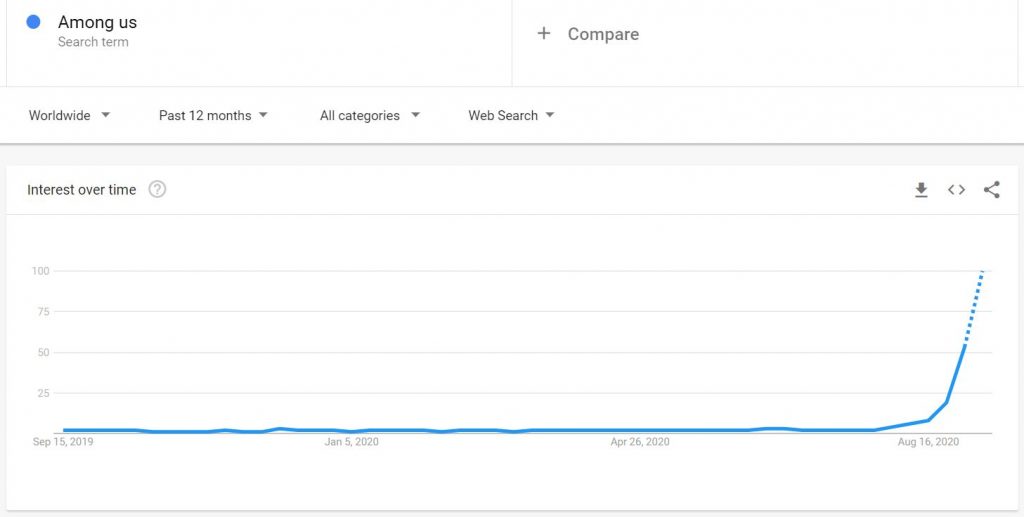
upward trend of Among Us

The game now sits at 11th most popular by player count on Steam. It is also at the number 1 spot for Top Free Games on both Android and iOS. You’ll see many big internet celebrities playing this game, maybe you can also give it a try. Playing with a group of friends is, of course, the best way to play Among Us. However, joining a public game can also be very enjoyable.


What are your opinions on Among Us being the most trending game currently? Let us know in the comments section below!

For more Mobile Gaming news and updates, join our WhatsApp groupTelegram Group, or Discord server. Also, follow us on InstagramTwitter, and Google News for quick updates. 

Read More

Share Tweet Pin It +1

0 Comments

In

Akshay Kumar starrer 'Laxmmi Bomb' makers hide 'like/dislike' count on trailer, netizens call them 'coward'

'Laxmmi Bomb' makers hide like/dislike count on YouTube trailer, netizens cite Alia Bhatt starter Sadak 2's recording making number of dislikes on the film's trailer as the reason behind the move.


laxmmi bomb

In a recent and surprising piece of news, Akshay Kumar-Kiara Advani starrer 'Laxmmi Bomb' makers have enabled a feature on their trailer video on YouTube that allows them to hide the number of likes and dislikes the video is receiving on the platform. 

The upcoming film's trailer was released on Friday after fans had been waiting for a glimpse of the much-talked-about flick all set to release on November 9. 

Read More

Share Tweet Pin It +1

1 Comments

In

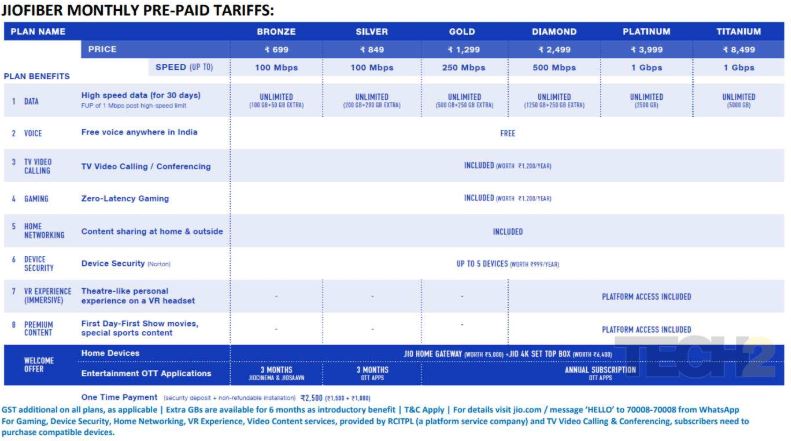
Jio Fiber Plans: Everything you need to know about plans & tariffs

 Mukesh Ambani's much-anticipated fiber-to-the-home (FTTH) service is finally here. JioFiber plan rentals will start at Rs 699 and will go up to Rs 8,499. The lowest tariff will start with 100 Mbps speed. Most tariff plans come with access to all the services.


Launched on August 12, Jio Fiber saw its commercial rollout on September 5. The service, which has the potential to alter the broadband landscape in India, offers a free HD TV set, free voice calls for life from landline, 100 megabit (mbps) to 1 GBPS broadband speed at a subscription rate of Rs 700 a month.

JIOFIBER MONTHLY PRE-PAID TARIFFS:
Reliance
Agencies

WITH TODAY'S LAUNCH, ONE CAN GET THESE SERVICES:
1. Ultra-high-speed broadband (up to 1 Gbps)
2. Free domestic voice calling, conferencing and international calling
3. TV video calling and conferencing
4. Entertainment OTT apps
5. Gaming
6. Home Networking
7. Device Security
8. VR Experience
9. Premium Content Platform


Ambani is eyeing 3.5 crore subscriber for this gamechanger and has already got registrations from as many as 1.5 crore homes across 1,600 cities in India.

LONG-TERM PLANS
1. JioFiber users will have access to 3, 6 and 12 month plans that provides substantially higher value
2. Through bank tie-ups, Jio will provide attractive EMI schemes, so customers get the benefits of annual
plans by paying only monthly EMI

Here are all the details about the subscription plans, how to buy and other services Jio is offering:
* Subscription plans:
The plans will start from Rs 699 and will go up to Rs 8,499 per month, depending on the internet speed from 100 Mbps to 1Gbps.
* Free for 2-months:
New subscribers under the preview offer will get the JioFiber services free for two months.
* How you can get Jio Fiber:
Visit the Jio official website to register for the Jio Fiber connection. You have to submit your details like address, name and mobile number. After registration through mobile OTP, a Jio executive will visit your place to verify all information.
* Jio Fiber cable TV:
Cable TV service will be provided under a separate payment subscription plan through the cable fiber or DTH.
Jio will also offer free Set Top Box for the cable service. It will also offer gaming, video calling Virtual Reality and Mixed Reality services.

Free high definition TV:
Company will offer free 4K LED TV in its welcome offer.

Free voice calls:

Under Jio Home Phone, the company offers landline services bundled with broadband connection. It will offer free voice calls to domestic phone users and affordable international calls.

Installation charge:
Installation for Jio Fiber is free, but, the company will charge a refundable Rs 2,500 for the internet router.

Content offerings:

All Jio Fiber customers will get free access to Jio's content apps like Jio TV and Jio Cinema.

Movie release:
The other major highlight of Jio Fiber is "First Day First Show" service of latest mavies that is likely to be launched next year.

Read More

Share Tweet Pin It +1

2 Comments

In

Re-opening guidelines out: MHA lets states reopen schools from 15 October. Conditions apply

A decision on opening colleges would be taken later. Institutions that have doctoral and postgraduate researchers in science and technology streams that require laboratory work can also open.

The home ministry guidelines require state governments to reopen schools in a graded manner in consultation with managements of schools and based on their assessment of the situation.

State governments have been given a free hand to reopen schools after 15 October under the Centre’s Unlock 5.0 guidelines announced by the Union home ministry on Wednesday. A decision on opening colleges would be taken later. Institutions that have doctoral and postgraduate researchers in science and technology streams that require laboratory work can also open.

The home ministry guidelines require state governments to reopen schools in a graded manner in consultation with the management of schools and based on their assessment of the situation. This flexibility to the states to decide on reopening schools, however, is contingent on six conditions listed by the Union home ministry.

1. Online and distance learning shall continue to be the preferred mode of teaching and shall be encouraged.

2. Where schools are conducting online classes, and some students prefer to attend online classes rather than physically attend school, they may be permitted to do so.

Also read: Re-opening guidelines out; multiplexes, swimming pools to partially open from October 15

3. Students may attend schools and institutions only with the written consent of parents.

4. Attendance must not be enforced and must depend entirely on parental consent.

5. States will prepare their own standard operating procedure regarding health and safety precautions for reopening of schools based on the procedures to be outlined by the Union education ministry.

6. Schools, which are allowed to open, will have to mandatorily follow the SOP to be issued by the state education department.

In Wednesday’s Unlock 5.0 guidelines, the Centre hasn’t spelt out its stand on reopening colleges and institutions of higher education. The timing of reopening colleges would be taken by the department of higher education in consultation with the Union home ministry based on the assessment of the situation, the guidelines said.

Online learning shall continue to be the preferred mode of teaching for colleges and shall be encouraged.

The decision on reopening these institutions run by the central government would be taken by its head, who will have to satisfy himself/herself that there is a genuine requirement of research scholars of the two streams to come for laboratory or experimental works.

The state government has been empowered to decide on reopening individual institutions under state and private universities for research scholars from the science and technology stream

Read More

Share Tweet Pin It +1

0 Comments

In

How to Install Windows 10 on Android Without Root/Computer


How to Install Windows 10 on  Android Without Root/Computer

Image for post

From installing macOS with VMware and VirtualBox to developing apps and beyond, Windows is the solid option for operating them all. While Windows 10 is the most powerful and at the same time, the most useful operating system, installing it is also one of the easiest things we’ve ever done compared to installing other operating systems even installing macOS in Windows is pretty easy. While installing Windows 10 might be risky for some, it’s pretty easy to install Windows 10 on a virtual machine. But better than that, what’s more interesting is to install Windows 10 on Android without root or computer involved.

Just like installing macOS Catalina or macOS Mojave on Windows, you might have thought of adapting Windows 10 over away. But the question still remains unanswered to where. It’s pretty known to everyone that installing Windows 10 is almost possible on every computer even Mac and any other computer we’d want, but out of those, where we could install it elsewhere. So here’s an option we’ve left to install Windows 10 on Android.

  • With the high-end mobiles which have at least over 8GBs of memory and 64GB of storage, we’ve a pretty solid computer right. But still, they’d be the smartphone you assume which wouldn’t be able to do most things a computer does. For instance, installing other operating systems, graphic designing, video editing, developing apps, and more. There are lots of things which a smartphone mightn’t be able to do what a computer does yet but still, there are a few things which a smartphone can do from the stuff what a computer does. One of those is install Windows 10 on Android without root or computer. We’ll show it in a moment with shots. In this tutorial, I’ll show how to install Windows 10 on Android, any device, any version without rooting or doing from computer, none of them, so here’s how to do it.

Install Windows 10 on Android Without Root/Computer

Just like virtual machines, installing Windows 10 on Android requires a powerful smartphone which could power the Windows 10 from its resources that would be assigning a slice of its storage, memory, power and a few more. For this purpose, we’d use a third-party application which isn’t supported or authorized by Google or Microsoft. This might have some risk involved but this doesn’t mean definitely it will harm or mess things up. In some cases, like lack of power like storage or memory or lack of any other thing might make some problem but that’s a usual thing that every procedure does if there’s lack of something.

Except those, we’ll install Windows 10 on Android beside Android OS, similar to dual-boot on a computer which will allow using Windows 10 and Android OS both. For caution and making everything safe, we’d recommend taking a complete backup of your Android device before. Taking a backup of your phone is pretty easy with Smart Switch or other apps.

Step One — Install JPCSIM From Play Store

The first and foremost step we need to do is install JPCSIM which will help run Windows. The installation is easy and quick.

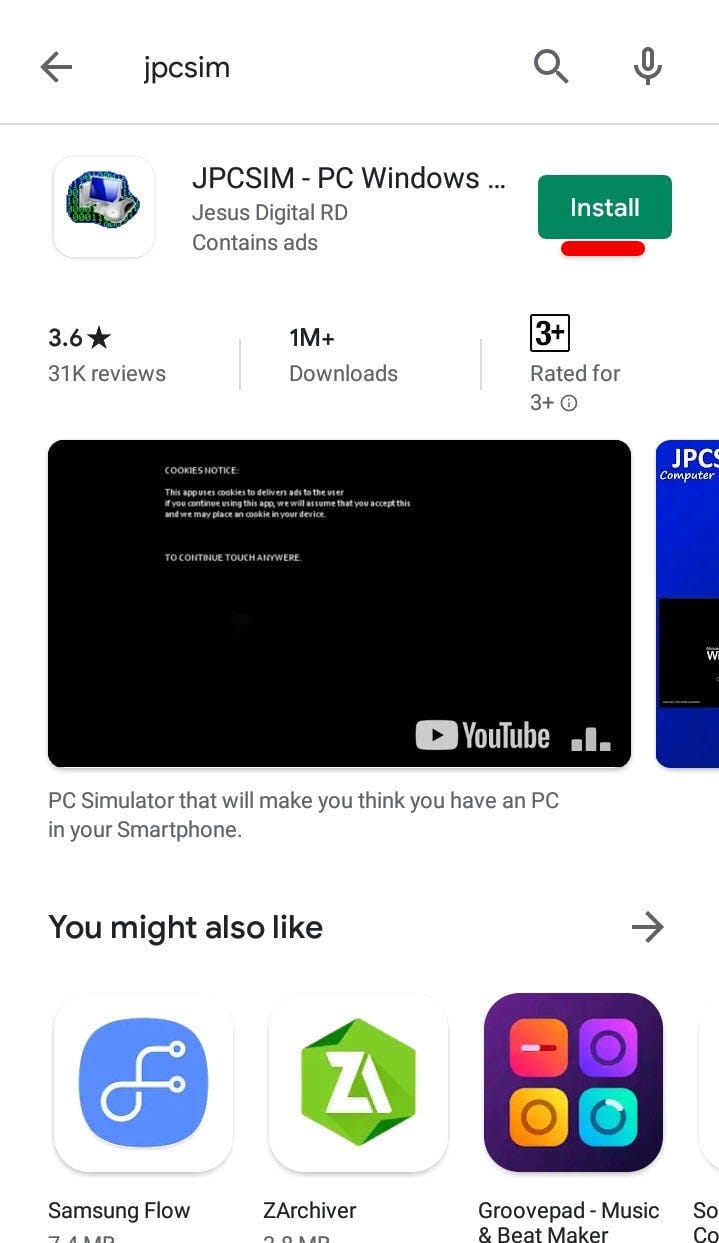
Simply head over to the Play Store and search for JPCSIM and click on Install.

Install JPCSIM
Install JPCSIM

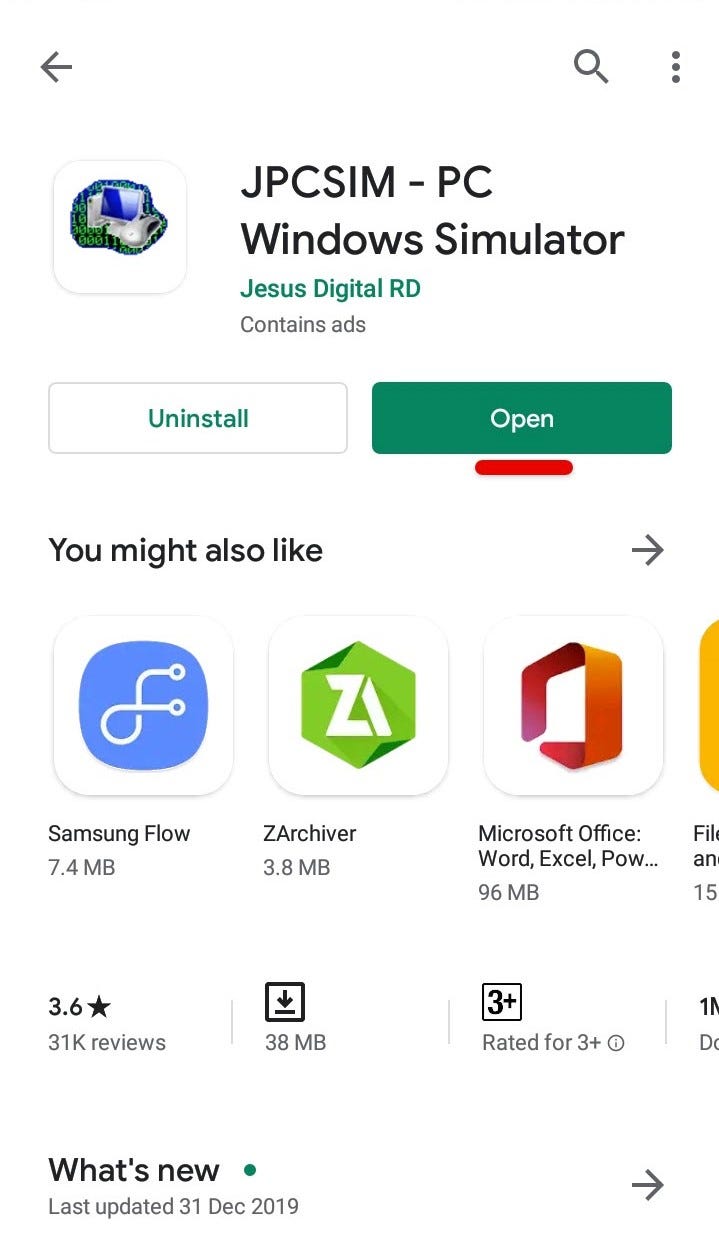
Once it’s finished, click on Open.

Open App
Open App

Step Two — Install Windows 10 on Android

Go ahead and tap yes on the screen.

Important Information

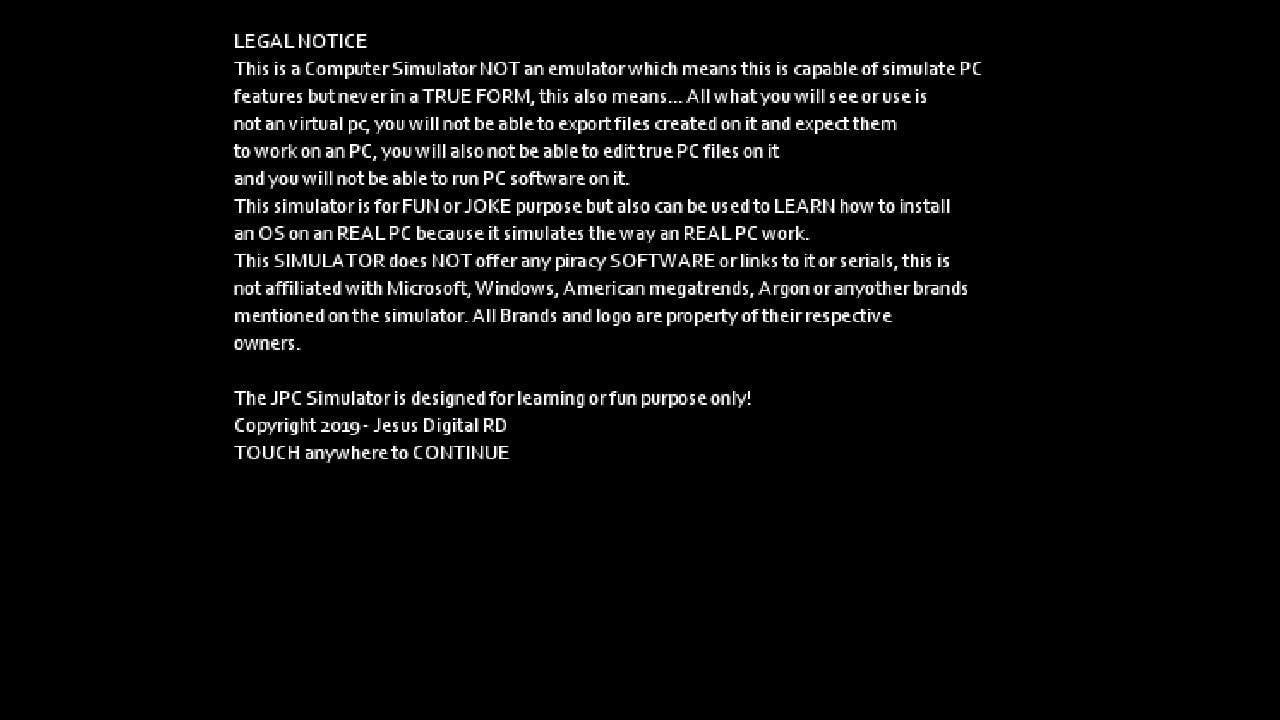
Next up, tap somewhere to continue.

Legal Notice
Legal Notice

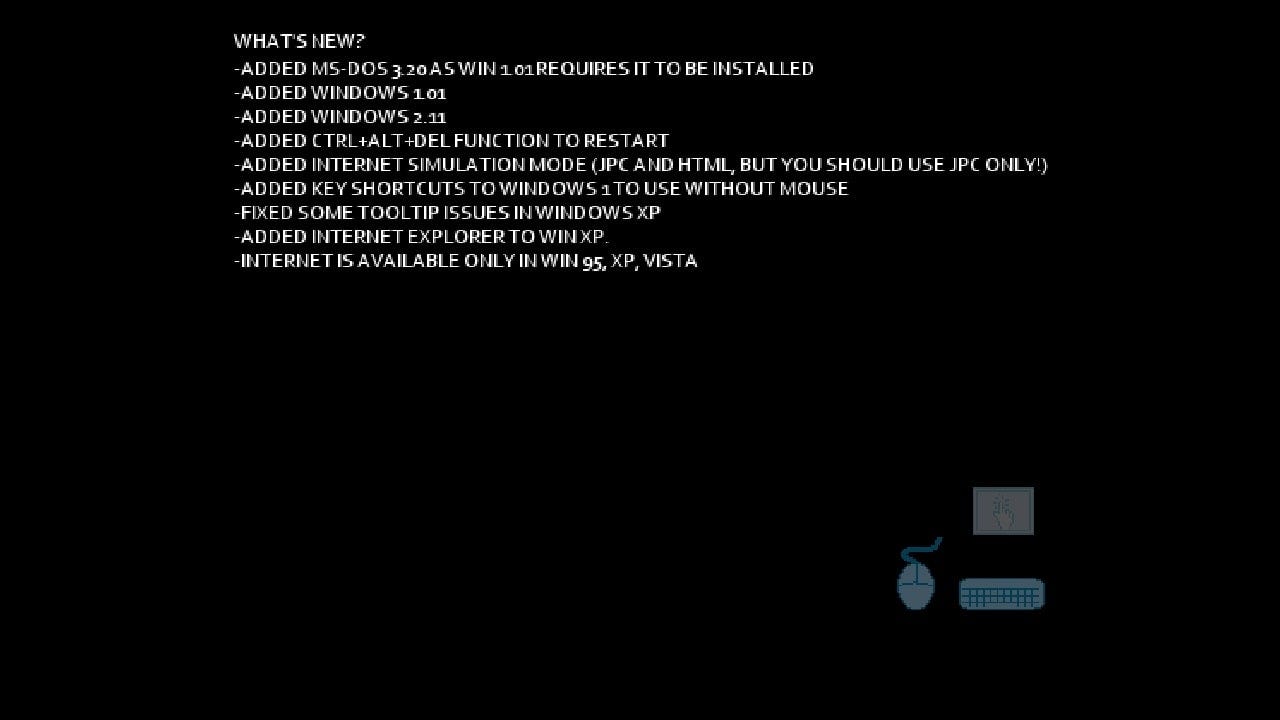
Now tap somewhere on the screen to continue.

Info
Info

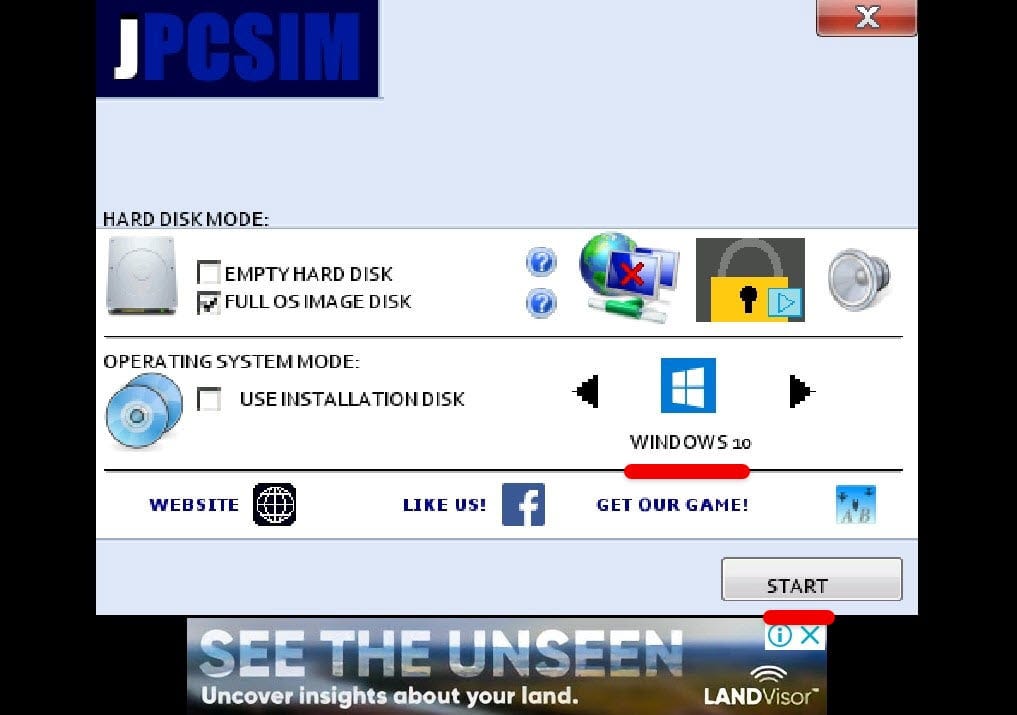
In this step, change the Windows version by tapping on the side button, so when Windows 10 appears, click on Start.

Choose Windows Version

This will begin loading Windows 10 so it will take a while.

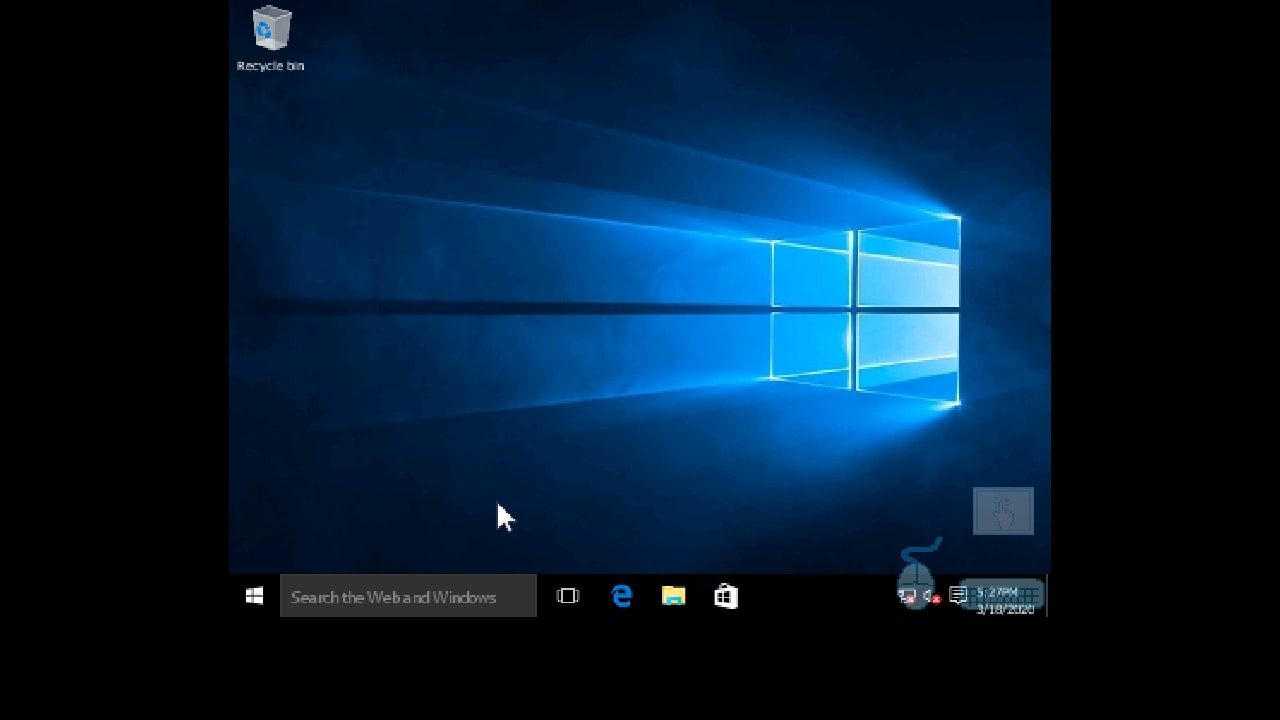
Once it’s finished, you’ll see Windows 10 booting and then signing into Android account so it will appear on desktop. For mouse 🖱 to work, simply click on the mouse icon first then start moving the mouse.

Windows 10 Running on Android

That comes to the end of this tutorial. The Windows 10 is now running on Android without root and without computer. There’s no need of those. In terms of functionality, if you’re curious, it works super well but can’t do heavy tasks, so it works great for surfing and trying out. To close this, simply press the home button so it will be out.

That’s it. If there’s something remaining or would like to add, suggest or give us some idea, we’re happy to know.

Read More

Share Tweet Pin It +1

1 Comments

Search This Blog

Powered by Blogger.
  • ()

3 Reasons why Among Us is trending now after the release in 2018

This post was last updated on   September 24, 2020 at 6:22 pm Although released in 2018,  Among Us  suddenly shot up the  trending  list rec...

Followers